Few topics around World of Warcraft account ownership are surrounded by as much confusion — and as much deliberate misinformation — as the registered name on a Battle.net account. Ask around and you will hear that it cannot be changed, that changing it requires legal paperwork, or that changing it somehow "locks" an account to its new owner. None of that is true today, and one of those beliefs is the exact lever scammers pull to take advantage of buyers.
This guide clears it up: what the registered name is, how to change it yourself in about ten seconds, what actually changed with The War Within, and why treating a name change as a security feature is a mistake that can cost you the account.
The Short Answer
Yes, you can change the registered name on a Battle.net account, and you can do it yourself. It lives in your Account Details → Personal Information as a plain, editable first name / last name field with a Save button. There is no ticket, no upload of a marriage certificate or court order, no waiting on a Blizzard representative, and no fee. You type a new name, you click Save, and it is done.
That alone surprises a lot of people, because for years it was not the case — and because a fair amount of the internet still describes the old process.
What "Registered Name" Actually Means
It helps to separate three different "names" attached to a WoW account, because they are constantly mixed up:
- Registered name (real name): The legal/personal name stored on the Battle.net account under Account Details. This is the one this guide is about, and the one that is now self-editable.
- BattleTag: Your public display handle (e.g. *BrownElekk#1234*). It is cosmetic, visible to friends, and changed through a separate (and historically paid) BattleTag change.
- Character name: The name of an individual WoW character in-game. Changing it is a paid in-game / shop service and has nothing to do with the account-level registered name.

It Wasn't Always This Easy: What Changed After The War Within
This is the root of the misconception. For most of Battle.net's history, the registered name was effectively locked. To change it you had to open a support ticket with Billing & Account Services and justify the change — typically by providing documentation of a *legal* name change such as a marriage certificate, a court order, or a government-issued ID. Blizzard's own help articles still lean on that framing, instructing you to "contact Customer Support to update your name."
Around the launch of The War Within (2024), that changed in practice. The registered name became a directly editable field inside Account Details — the same lightweight, self-service edit you would expect for any profile setting. No ticket, no proof, no human in the loop.
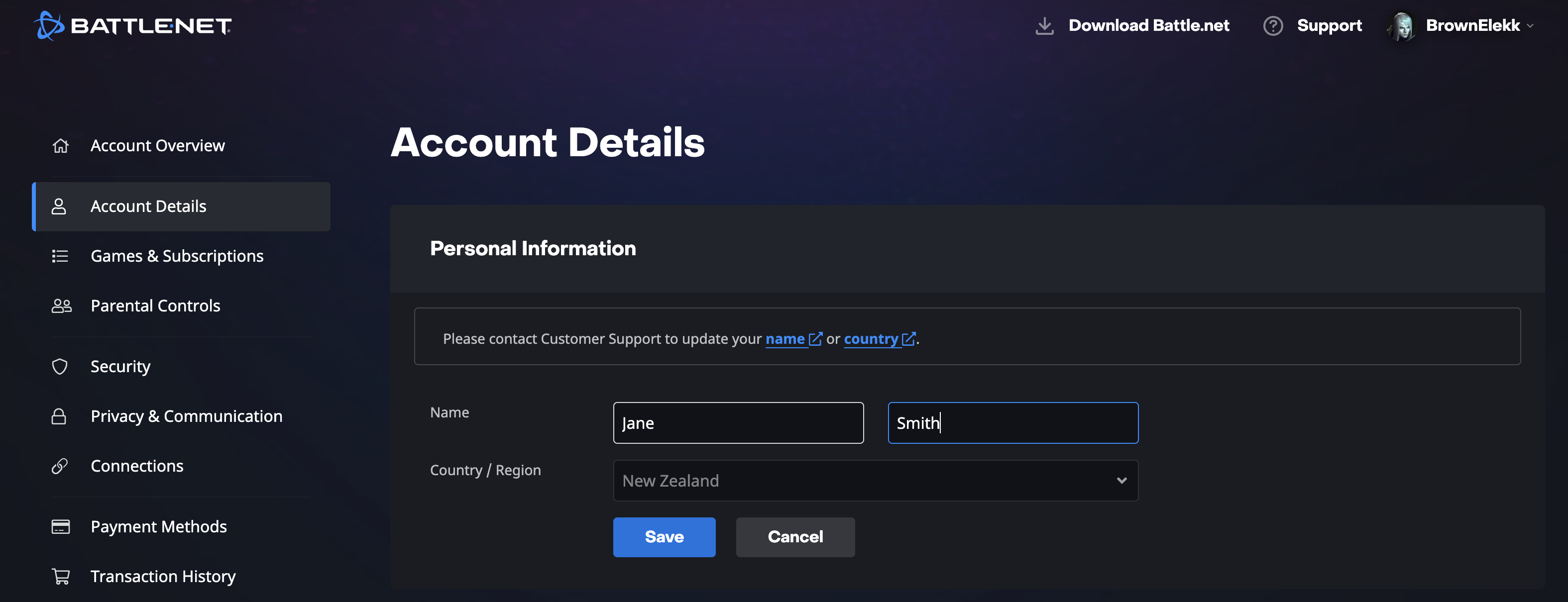
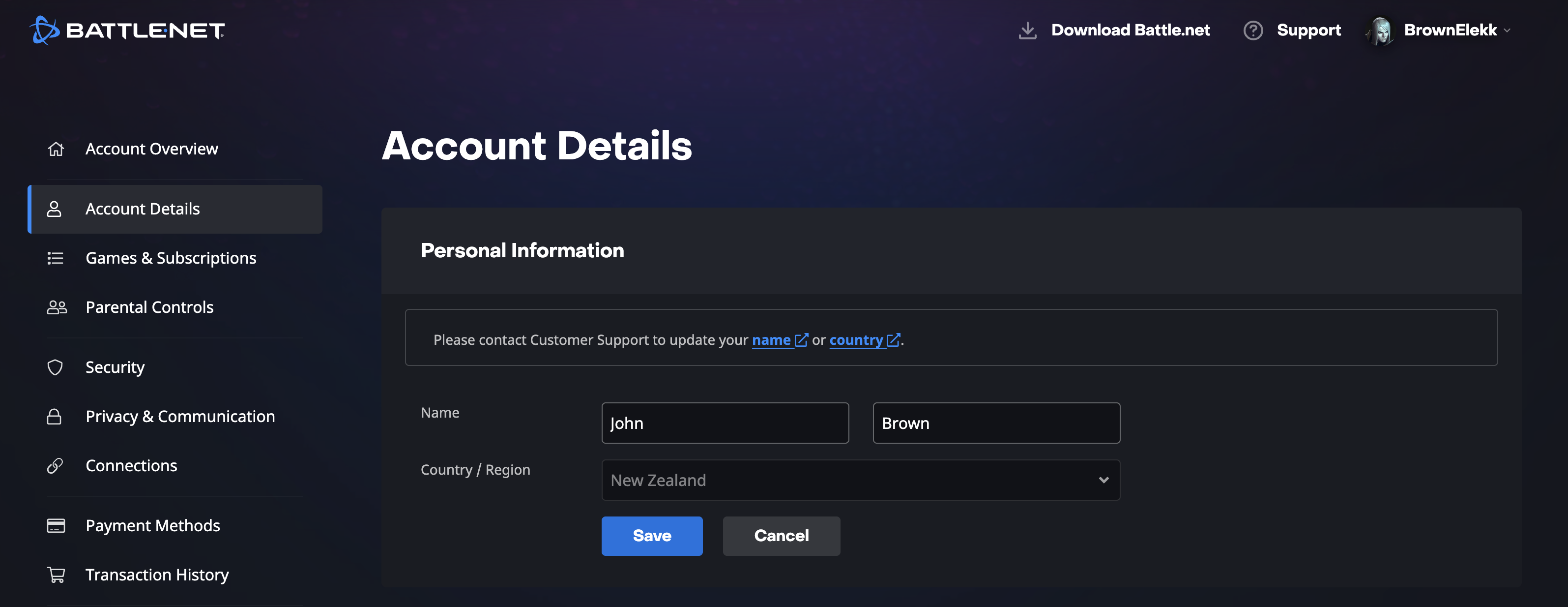
One honest caveat worth flagging: Blizzard's documentation and even the in-page helper text have not fully caught up. As you will see in the screenshots below, the page *still* displays a legacy banner reading *"Please contact Customer Support to update your name or country"* — sitting directly above name fields that are, in fact, freely editable with a Save button. The old messaging lingers; the actual capability has moved on. This gap between the stale documentation and the live behavior is a big part of why the "you can't change it" myth persists.
How to Change the Registered Name on Your Battle.net Account
The whole process takes seconds:
- Sign in at your Battle.net Account Management page (account.battle.net).
- Open Account Details from the left-hand sidebar.
- Find the Personal Information section and the Name row (first name and last name fields).
- Click into either field and type the new name.
- Click Save. The new registered name takes effect immediately.
The Big Misconception: A Name Change Does NOT Secure an Account
Here is the belief that causes real damage: the idea that changing the registered name "secures" the account, "removes" the previous owner, or otherwise creates a barrier against recovery. It does none of those things.
The registered name is profile data, not an access control. It does not gate password resets, it is not a factor in two-factor authentication, and it does not sit anywhere in the account-recovery path. Account recovery and ownership disputes are decided by things like the original registration email, the original payment and purchase records, CD keys / game-license history, security questions, and identity verification — not by whatever name currently sits in the Personal Information field. Editing that field changes a label. It does not change who can prove they own the account.
So if anyone tells you that changing the name will stop the original owner from coming back, they are either mistaken or selling you something.

Does Changing the Name Add Risk? Not by Itself
Two things are true at once here, and they are easy to conflate. First: changing the registered name does not create a security hole. The edit by itself does not expose the account, weaken your control, or hand the previous owner a new way back in. It is harmless on its own.
Second: the registered name is also not what *protects* you. What determines whether a purchased account stays yours is the integrity of the purchase and handover — covered in the next section — not the label in the Personal Information field.
The one scenario where a name mismatch matters at all is a recovery *dispute*, and that scenario is exactly what safe purchasing prevents. Blizzard keeps the original name and purchase records on file, so in a contested recovery a mismatched current name can read as a sign the account changed hands. But note where the exposure actually comes from: an insecure purchase that left the door open to a dispute in the first place — not the act of editing a name. Buy the account properly and there is no dispute for any mismatch to matter in. (Blizzard doesn't publish how it weighs these cases, so this reflects how recovery realistically plays out and the logic of the records involved, not a quoted policy.)
So where does that leave you? If you bought the account the right way, changing the name is a non-issue — change it or don't, it doesn't move your security either way. And if you want to update it for cosmetic or personal reasons, go right ahead; it won't hurt anything. The point of this guide is not "never touch the name." It is: don't let anyone sell you a name change *as* security, and don't mistake it for the thing that actually keeps your account safe.

The Scam: "Name Change" Sold as a Security Service
Now the practical warning. Because so many buyers believe a name change adds security, scammers and low-effort sellers package it as a premium, value-adding service:
- *"I'll change the account name to yours so the old owner can never get it back."*
- *"Name change included for extra security — normally a paid add-on."*
- *"Once I switch the registered name, the account is locked to you."*
If a name change is being presented to you as the reason an account is safe to buy, treat that as a red flag about the seller, not a feature of the account.
What Actually Protects a Purchased Account
Security on a transferred account comes from the handoff itself and from removing the previous owner's footholds — not from cosmetic profile edits. The factors that genuinely matter include:
- A complete, verified handover of credentials and the original registration email (so the buyer controls the real recovery vectors).
- Resetting passwords and security questions, and re-establishing two-factor authentication under the new owner's control.
- A seller who is transparent about the account's history rather than leaning on theatrics like a "name change for safety."
- Buying through a process that vets the account and stands behind delivery, instead of an anonymous trade where your only "assurance" is a meaningless setting tweak.
FAQ
Can you change the name on a Battle.net account yourself? Yes. The registered name is an editable field under Account Details → Personal Information. You type a new first/last name and click Save — no ticket and no documentation required.
Do you need a support ticket to change your Battle.net name? Not anymore. Historically it required contacting Billing & Account Services with proof of a legal name change, but around The War Within (2024) it became a self-service setting. Some of Blizzard's documentation and a legacy on-page banner still reference the old "contact Customer Support" process even though the field is directly editable.
Does changing the registered name make a WoW account more secure? No. The registered name is cosmetic profile data. It plays no role in password resets, two-factor authentication, or account recovery, so editing it adds no security whatsoever.
Will changing the name stop the original owner from recovering the account? No — but it doesn't expose you either. Recovery is decided by the original email, purchase records, and identity verification, not the registered name. A mismatch only matters in a dispute, and a safe purchase (clean credential and email handover) is what prevents disputes in the first place. Change the name or don't — it won't move your security either way.
Is the registered name the same as my BattleTag? No. The BattleTag is your public display handle (Name#1234) and is changed separately. The registered name is the personal/legal name on the account. Character names are a third, in-game-only thing changed through a paid service.
Should I pay a seller extra for a "name change service"? No. It is free, takes seconds, anyone with access can do it, and it provides no security benefit. A seller pitching a name change as protection is a warning sign, not a selling point.
Buy or sell World of Warcraft accounts?
Browse available World of Warcraft accounts from screened sellers.