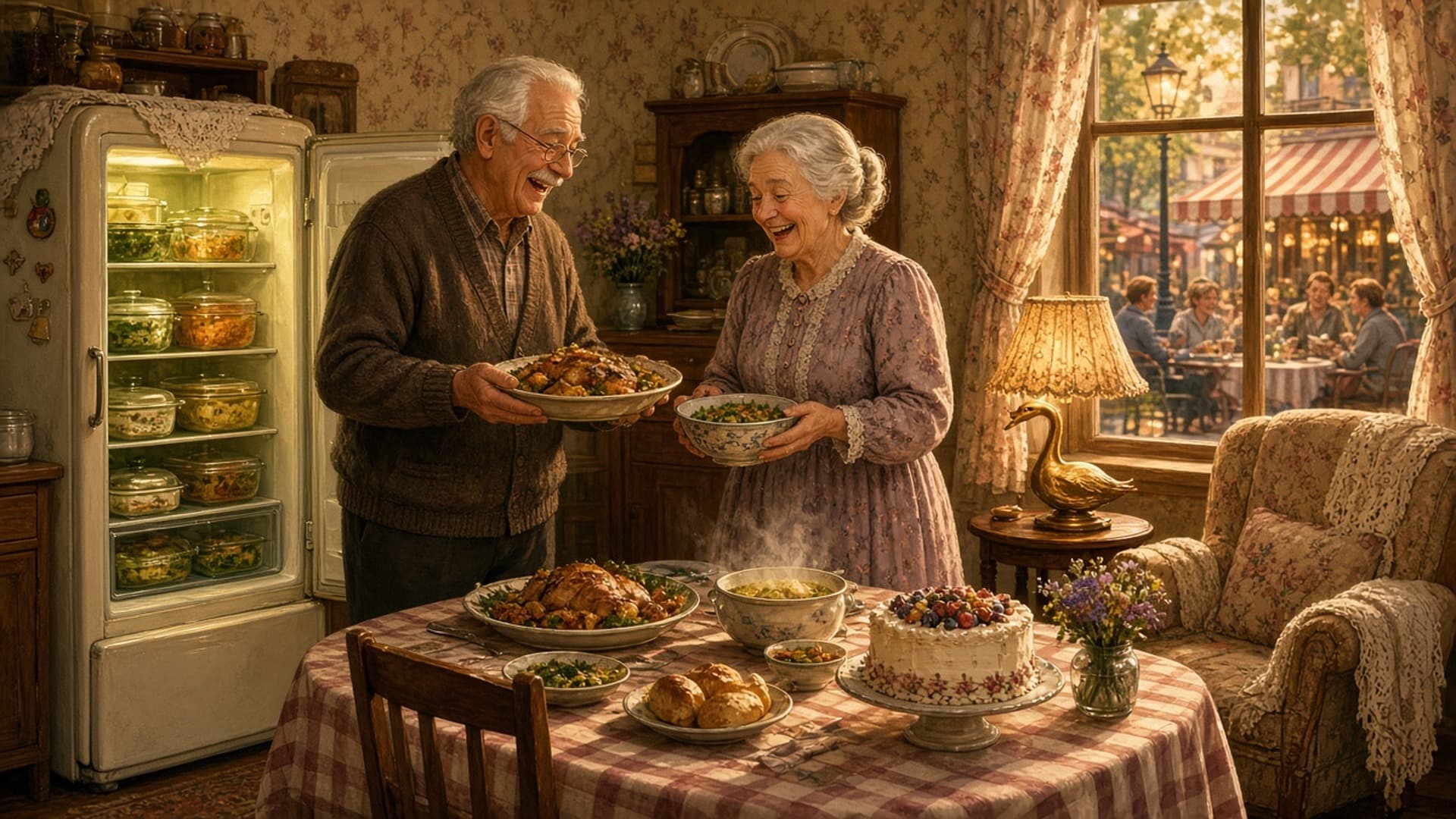
The Sims 4 got its October quality of life update today, and the theme is food. EA's patch, titled "Order Up!", is built around eating, dining and drinking: a full pricing and calorie pass across every pack, smarter leftovers, a fridge menu that finally opens with one click, and more than 25 fixes for Dine Out restaurants where customers kept wandering off to jog, hug strangers or dig through the trash instead of eating.
On top of that, every player gets a free collection of Elder themed Create a Sim and Build Mode items, plus new options to switch off muscle and weight changes. If you have ever built a Sim exactly how you wanted and watched them slowly change shape over a few in game weeks, this is the setting you have been waiting for.
Everything below comes from the official Sims 4 update notes for October 27, 2026 on EA's site. We have grouped the changes by what you will actually notice in play, and called out the fixes most likely to affect long running saves.
Update Version Numbers and Platforms
EA lists the following builds for the October 27 update:
The update is free and downloads automatically through the EA app, Steam or your console. If you use mods or custom content, read the section on mods below before you load your main save.
Free Elder Content: Classic Looks and Cozy Nooks
The headline freebie is a base game collection aimed at older Sims. EA describes it as "elegant new hairstyles, cozy cardigans, and timeless dresses" for Create a Sim and "charmingly vintage furniture" for Build Mode. You do not need any pack to use it.
Build Mode items
The update adds 11 Build Mode items:
- The Needlepoint Nook Chair (armchair)
- Light of Yesteryear (sconce)
- The Glowlden Goose (table light)
- Heritage Home Drapery in regular, Wide and Extra Wide sizes
- Petals and Proverbs Plaque
- The Floral Fossil (sofa)
- Granny's Roost Rug
- Bloom and Gingham Delight (wallpaper)
- The Early Bird Bed (double bed)
Create a Sim items
In CAS, you get:
- 2 new hairstyles: Quiff Side Part and Half-Down Waves.
- 4 new clothing assets: Polo Shirt with Cardigan, Long Dress with Lace and Buttons, Sleeveless Blouse, and Long Skirt with Pockets.
- 5 recolors of existing items: High Waisted Jacket, Long Blazer, Granny Dress, Open Cardigan and Loose Pants with Crease.
None of this is gated by age in the sense of being unusable on younger Sims, but it is clearly designed for Elders, a life stage that has long had fewer CAS options than Young Adults.
New Toggles for Muscle and Weight Changes
This one came directly out of EA's Discord developer Q&As. The update adds:
- New Game Options to turn muscle changes and weight changes on or off across your whole save.
- New self interactions on Sims that toggle muscle and weight changes on or off for that Sim individually.
In practice this is huge for players who spend a long time in CAS. A Sim who works out every day no longer has to end up looking like a bodybuilder, and a Sim who eats a lot of cake does not have to change shape either, unless you want them to. Storytellers who like those changes as part of the simulation can just leave the defaults alone.
EA also fixed two related issues where doing Free Weights (Adventure Awaits) or Sword Fighting (Royalty and Legacy) caused intense muscle gain or weight loss.
Food, Dining and Drink Improvements
Food is the main theme of this patch, and there are some genuinely useful changes here.
- "Open" is now first on the fridge pie menu. Another Discord Q&A suggestion. Checking what is inside the fridge no longer means hunting through a list of interactions.
- Pricing and calories rebalanced. EA did what it calls "a comprehensive tuning pass" on prices and calories for every food and drink item across the base game and all packs, so the numbers are more consistent.
- Sims prefer leftovers. Hungry Sims should now autonomously eat leftovers from the fridge or counter instead of cooking a whole new meal. This saves money and stops kitchens filling up with plates.
- Family Recipes expanded. The Family Recipes feature from Businesses and Hobbies now includes more than 375 existing dishes, many of them cultural dishes, across the base game and all packs. EA says a small handful did not make the cut, either for technical reasons or because they did not fit a "family dish", giving graham crackers as the example.
- "Quickly Decorate" for baked goods. Items made with the Baking skill (Get to Work) now have a quick decorate interaction when they are not on the center of a countertop. Before, Sims would simply fail to route, with no clear reason.
Base game eating fixes
Several fixes target annoying everyday behavior:
- Sims are more likely to stay seated while eating at a table. EA fixed multitasking issues where trying to chat while eating made them stand up.
- Sims will no longer put food in odd places like display cases. Dining tables and countertops are now the main places for dishes.
- Sims can now drag food prepared by another Sim into the fridge.
- Sims will no longer get stuck jogging with food in their hand.
- The Cooking Volume 2 skill book title now reads "Cooking Vol 2: Let's Keep Cooking!" with correct grammar.
Dine Out: 25+ Restaurant Fixes
If you own Dine Out, this is the part of the patch you have been waiting for. EA says it investigated Sims "breaking flows and not properly dining" and found the cause was a variety of interactions spread across many packs. The fixes read like a list of every way a restaurant could go wrong:
- Energized customers will no longer leave the table to go jogging.
- Customers will no longer view decor, dig in the trash, hug other Sims or watch TV instead of eating.
- Sims will no longer leave to do University homework (Discover University), play with paper airplanes (Adventure Awaits), get distracted by N.A.P. activities (Eco Lifestyle) or start sword duels at the table (Royalty and Legacy).
- No more mirror pep talks mid meal, and Sims keep eating when celebrities are around (Get Famous).
- Customers want to socialize less before they are seated.
- Waiters should show up for shifts, and customers should interact with employees properly, even when an employee is a special Sim from another pack.
- Some Dine Out recipes were wrongly tuned to need Cooking skill 1. EA rebalanced them to restore the intended chef progression.
- Customers no longer eat standing up out of their hands.
- Waiters now clean dishes when several Sims drop dishes at the same station.
- Square tables with a light in the middle now have a corrected footprint, so Sims can sit and eat.
- EA added guardrails for Error Code 123:6346675a when traveling to certain restaurants.
- Toilet pranks no longer happen at restaurants or small businesses.
- Snowy Escape menu items can now be ordered when added to a restaurant menu.
- Funds now transfer correctly to retail, restaurant, vet or household when a small business is open.
- Boba Tea ordered at a restaurant now has its liquid, cap and straw.
- Restaurant uniforms no longer revert to the default after you change them, and CAS no longer opens automatically when you change a staff uniform unless you press Edit.
- Customers should no longer leave food or drinks unfinished before checkout.
- Hot and Cold Weather options are now available for "Guest Attire" in restaurant dress codes.
Other Food Fixes by Pack
- Seasons: food stalls no longer stay closed during festivals, and Sims will not autonomously use grills in snow, rain, ice or storms.
- Eco Lifestyle: Fizzy Juice prices no longer drop after the first sale on Food Stands, and Sims will autonomously drink Fizzy Juice, seltzer and kombucha when they want fun.
- Cottage Living: Sims can grill salmon or bake raspberry pie with the Simple Living lot challenge on.
- Horse Ranch: Sims no longer sit down before pouring Nectar, and the correct number of Nectar bottles shows after a Food Stand sale.
- For Rent: Faux Meat Butter Chicken from the Pressure Cooker no longer gives vegetarians the "Tainted with Meat" moodlet, the FireBOSS Grill of Grilliness now has Cooking skill and food quality attributes, and Sims stop obsessing over the Pressure Cooker.
- Adventure Awaits: Sims will clean dishes when it is a scheduled activity at custom venues and getaways.
- Outdoor Retreat: Sims no longer abandon meals to play horseshoes.
- My Wedding Stories: the Chinese inspired food stand in Tartosa now sells food instead of produce.
Bonus Quality of Life Changes
Three smaller additions that you will use more than you expect:
- Lockable TVs. Televisions can now be locked like computers, so only certain Sims use them. EA's example is a child's playroom TV that adults keep stealing.
- "Sim Options..." menu. All the self interactions that used to float around uncategorized now live in one "Sim Options..." category when you click your active Sim. That includes Disable Attraction (Lovestruck), Rock Paper Scissors preference (Adventure Awaits), Utensil Preference (Snowy Escape) and Sim Physique (base game).
- Better save backups. Backups are now calculated differently, so they track properly even if you go a long time between play sessions.
Top Community Fixes
EA highlighted these fixes from the EA Forums as the most requested:
- An endless loading screen when placing lots, caused by heavy use of the Move Objects cheat, is addressed with a more robust navmesh.
- An infinite white screen when loading certain save files is resolved. EA says some lot details may need a little rebuilding, but the saves load again.
- Sims can order from bartenders while doing something else.
- Infants fall asleep properly without needing very low energy.
- Fairy Sims bitten by werewolves now become full werewolves without black visual corruption.
- Sims no longer stay frozen after naps and other interactions, or while planning routes.
- Reborn Sims (Life and Death) now correctly appear in the selected household and in CAS, so the Rebirth process completes.
Crash Fixes and Mods
EA says the roughly 10 crash fixes in the September update led to "a notable decrease in crash rates across all platforms." October adds 14 new crash and assert fixes, including:
- A crash affecting a large number of Windows players, related to signed files.
- A crash on PC and Mac when loading lots, tied to cursor and UI changes.
- A crash when a Sim failed to load because of trait incompatibilities.
- A crash when launching the game through the EA app.
- A crash when a romance story arc advanced from "lovebirds" to "lovers".
- A crash when uploading a large family to the Gallery from CAS.
- A PlayStation crash on the way to the main menu when two store data tasks ran at once.
- Move your Mods folder out of the game directory before your first launch.
- Load the game once without mods to confirm it starts and your save opens.
- Check each mod creator's page for an updated version for this patch.
- Add mods back in small batches so you can spot the one that breaks things.
- Keep a manual copy of your save folder, even with the improved backups.
Console, CAS, Autonomy and General Fixes
A quick roundup of the rest:
- Console: the "Something Went Wrong" pop up now closes with a controller on PlayStation, and loading from Live Mode to Build Mode on PlayStation is faster.
- Gallery: consoles no longer freeze for 20 seconds or more after opening a player's Gallery catalog.
- CAS: hair and eye colors no longer revert when you pick a full body outfit and apply to all, Base Layer filters stop carrying over between Sims, and the Base Layer category is back for Merfolk and Fairies.
- Autonomy: NPCs send birthday party invites more often, visitors stop leaving venues instantly, Sims can kiss and make out in hot tubs again, and infants come back from daycare after the player travels to a gym.
- General: a save corruption issue that caused infinite loading is fixed, basement cameras adjust to the floor, adjacent apartments keep their furniture, and swimming around Sulani's diving buoy works again.
Is This Update Worth Jumping Back In For?
If you stopped playing because restaurants were broken or because a save would not load, yes. The Dine Out fixes are the biggest batch that pack has had in a long time, and the white screen and endless loading fixes target exactly the kind of bugs that make people give up on a long running legacy save.
For everyone else, the muscle and weight toggles and the fridge menu change are small, but they remove friction you hit every single session. The free Elder content is a nice bonus for anyone running a multi generation family.
Frequently Asked Questions
When did the October 2026 Sims 4 update come out?
EA released it on Tuesday, October 27, 2026. The versions are 1.129.39.1030 on PC, 1.129.39.1230 on Mac and 2.40 on console.
Is the Elder content in the Sims 4 October update free?
Yes. The two hairstyles, four clothing assets, five recolors, eleven Build Mode items, Styled Room and four Styled Looks are all added to the base game for free with the update.
How do I turn off weight changes in The Sims 4?
After updating, open Game Options to turn weight or muscle changes off for the whole save. You can also click a Sim and use the new self interaction to toggle them for that Sim only. The two settings are independent, and they do not apply to pets.
Do Sims eat leftovers now?
Yes. EA says hungry Sims should now autonomously prefer leftovers in the fridge or on the counter rather than cooking a new meal from scratch.
Will the update delete restaurant tables in my build?
It can in some cases. EA adjusted the footprint of square tables with a light in the middle, and warns that some of those tables could be deleted from older builds, especially ones placed with the Move Objects cheat. Check your restaurants after updating.
Does the October update fix the infinite white screen?
EA says it resolved an issue that caused an infinite white screen on certain affected saves. Some lot details may need to be rebuilt, but those saves should load again.
Why does my game crash after the Sims 4 update?
EA says many top crash reports are linked to outdated or conflicting mods. Remove your Mods folder, test the game without them, then add updated mods back in small batches.
How many bug fixes are in the October 27 Sims 4 patch?
EA lists over 150 bug fixes, including more than 25 for Dine Out, plus 14 new crash and stability fixes.
Final Thoughts
"Order Up!" is the kind of patch The Sims 4 needs more of: a clear theme, a lot of community requested fixes and a free content drop that actually fits the update. Restaurants should finally feel like restaurants, kitchens should stop piling up with fresh meals nobody finishes, and your carefully built Sims can keep the body you gave them.
Update, pull your mods out for one test launch, check any restaurant builds you care about, and then go set up a cozy Elder household with the new Gallery family.