How to Buy a Fortnite Account Safely in 2026
How to Buy a Fortnite Account Safely
Buying a Fortnite account means taking over an existing Epic Games account that another player built over time, including its cosmetics, account level, V-Bucks balance, and any linked platforms. You are not buying a fresh profile. You are inheriting someone else's login and everything attached to it, which is exactly why the buying process matters more than the price.
Full Epic email access and clear linked-platform disclosure are the two details that decide a safe purchase, and both are covered below. This guide explains how to do it safely: what to verify, what genuinely drives value, how the ownership transfer process works, and the red flags that should end a deal on the spot. Read it first, then shop. The buyers who get burned almost always skipped the boring part.
A safe purchase depends on control, not trust. AccountShark verifies the listing before it goes live, processes checkout through the marketplace, delivers account and email access through the buyer dashboard, and guides the buyer through the ownership transfer process. After delivery, warranty-backed support covers seller-caused access loss or not-as-described issues during the coverage window.
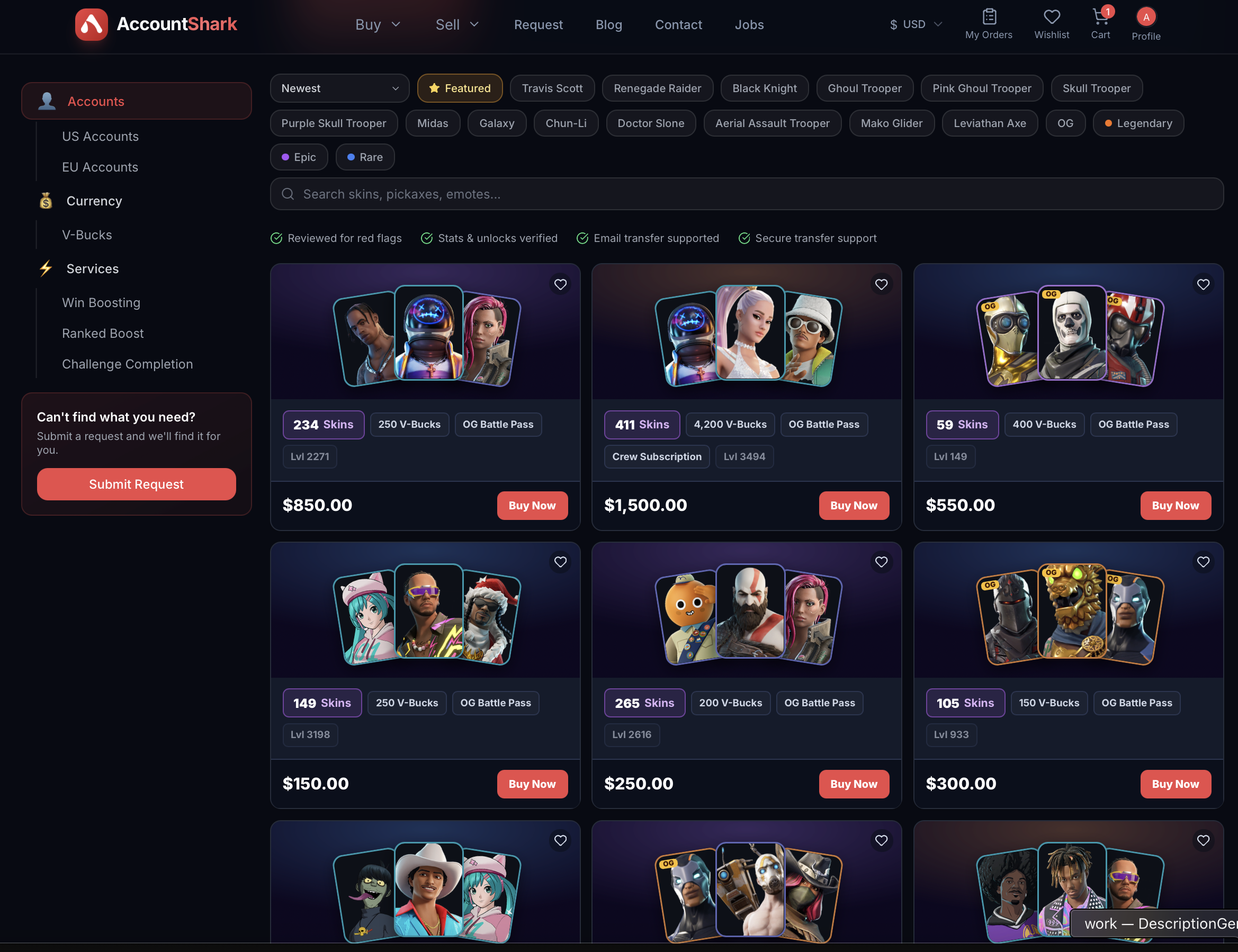
Every Fortnite listing on AccountShark previews the locker as skin thumbnails, with skin count, V-Bucks, and OG Battle Pass status shown on the card itself.
Is buying a Fortnite account against Epic's Terms of Service?
Yes, Epic's Terms prohibit buying, selling, and sharing accounts, and Epic can ban an account it detects as sold. We are not going to pretend otherwise. The honest picture, though, is that an instant ban on transfer is not the common failure mode. The two problems that actually hurt buyers are original-owner recovery and linked-platform complications.
Original-owner recovery happens when a seller still controls the old recovery email or has payment records on file, then files a support claim to pull the account back weeks later. Linked-platform issues happen when a PlayStation, Xbox, Nintendo Switch, or PC account is still attached and creates a path back to the previous owner. Most disputes trace to one of these two, not to Epic's automated enforcement. Both are avoidable if you take full control at handoff and buy from a source that confirms access before you pay.
A buyer's protection checklist
Lock the account down the moment it is yours, in this order:
Each step cuts off a route the previous owner could use to reclaim the account. Skipping the email step is the single most common mistake.
What to verify in a Fortnite account before you buy
Verify the locker first, because the cosmetics are the whole point. Confirm the specific rare skins by name rather than trusting a screenshot, and note the total counts across Skins, Pickaxes, Gliders, Emotes, Back Blings, and Wraps. A named Battle Pass exclusive like the Black Knight is worth more than a thousand common items.
Then work through the rest:
- Linked platforms, so you know what carries over and what could tie back to the seller.
- Email provider and whether you get full inbox access or just the Epic credentials.
- Account level and region, since region affects friend lists and some store behavior.
- Ban or strike status on the account.
- Save the World Founder status, which is sometimes included and adds value when it is.
How AccountShark shows all of this on a listing
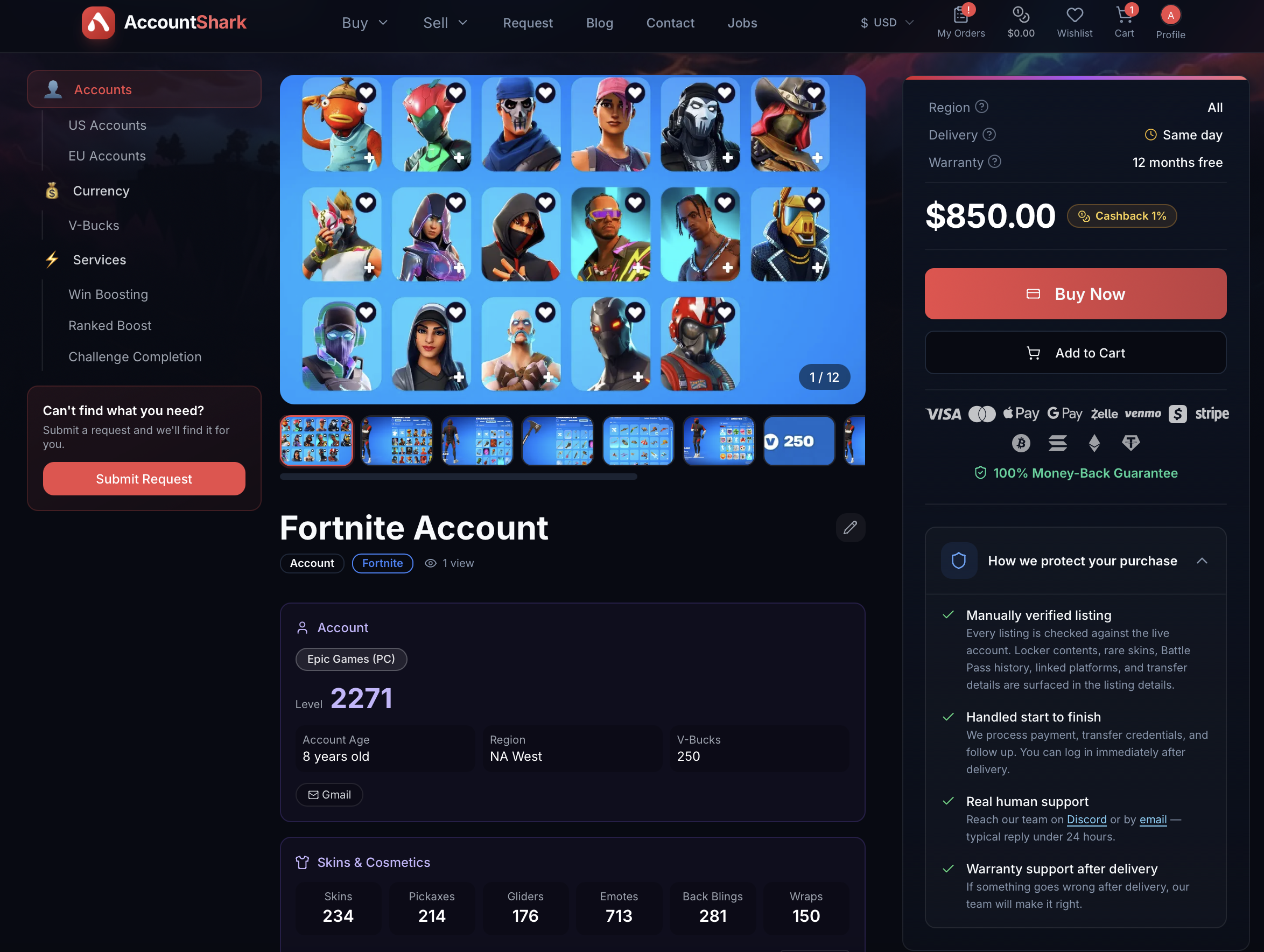
A Fortnite listing breaks down the full locker (skins, pickaxes, gliders, emotes, back blings, wraps), account level, region, linked platform, and email access, next to a How we protect your purchase panel.
AccountShark puts every one of those verification points on the listing itself, so you are not negotiating for screenshots in a direct message. Each Fortnite listing previews the locker as actual skin thumbnails with total counts for Skins, Pickaxes, Gliders, Emotes, Back Blings, and Wraps, so you can see the named OG cosmetics instead of taking a seller's word for them.
Alongside the cosmetics you get the account level, region, V-Bucks balance, the linked platform (for example Epic Games on PC), the email provider and access status, and the account age. Every listing is manually checked against the live account before it goes public, and sensitive identifiers stay off the public page. A "How we protect your purchase" panel spells out that the listing was verified against the real account, that the deal is handled start to finish, that real human support is involved, and that warranty coverage applies after delivery. You can browse the full catalog of verified Fortnite accounts and filter into OG accounts when scarcity is what you are after.
What actually drives Fortnite account value
Value comes from the combination of a deep collection and the rare items inside it, not raw skin count. Anything still in the regular shop adds little lasting scarcity because any buyer can get it. The accounts that hold value carry items from content that is gone, spread across every cosmetic category.
The clearest anchors are Battle Pass exclusives that left with their season, across categories: outfits like the Black Knight and Sparkle Specialist, the Black Shield back bling, the AC/DC pickaxe, and the Floss emote, plus promotional and collaboration cosmetics from expired promotions such as the Galaxy and iKONIK Samsung skins, Honor Guard, the Double Helix bundle, and the Travis Scott set. Early-season Battle Pass exclusives that left with their season signal an account active since the start. Beyond those, breadth matters: account level, a years-deep collection across back blings, pickaxes, gliders, emotes, and wraps, a V-Bucks balance, and Save the World Founder status all add up. If you want to compare named items, see Black Knight accounts and OG accounts.
Typical price ranges
Prices follow scarcity, so the tier an account lands in depends almost entirely on which discontinued cosmetics it holds. These are typical ranges, not fixed quotes:
| Tier | Typical range | What it holds |
|---|---|---|
| Entry | $25-$75 | Solid collections with a good item count but no marquee OG skins. The most affordable way in. |
| Mid | $75-$200 | A recognizable rare or two plus a healthy overall collection. |
| Upper-mid | $200-$600 | Multiple sought-after OG cosmetics or a strong early Battle Pass record. |
| Collector | $600-$3,000+ | Genuinely rare combinations, like accounts stacked with retired Battle Pass exclusives and expired promo or collab skins, that almost never come up. |
Treat these as direction, not fixed figures. A single iconic skin can move an account up two tiers, and condition factors like clean history and full email access affect what a listing is worth.
How AccountShark's ownership transfer process works
A secure purchase moves through clear stages so no money or credentials change hands on trust alone:
Because AccountShark processes the handoff, the seller never gets your details and you never get pushed into an off-platform chat. The warranty covers seller-caused access loss and accounts that are not as described. It does not cover buyer-caused problems such as bans, botting, real-money trading, sharing your credentials, or reselling the account.
Red flags to walk away from
Walk away the moment a deal pushes you off-platform, rushes you, or hides the account. Specific warning signs:
- A seller who will not confirm the rare skins by name or refuses to show the live account.
- Pressure to pay by irreversible methods or to "finish quickly" outside any protected checkout.
- No offer of full Epic email access, only the Epic login.
- Refusal to disclose linked platforms or ban status.
- A price far below the tier the account would normally command, which usually signals a recovered or stolen account.
Frequently asked questions
Can the original owner recover a Fortnite account after I buy it? It is possible if they keep the old recovery email or payment records, which is why taking full control matters. Change the email, password, and two-factor authentication immediately, remove saved payment methods, and buy from a source that confirms access at handoff so there is no lingering route back.
Do the rare skins transfer with the account? Yes, cosmetics live on the Epic account itself, so every skin, pickaxe, glider, and emote stays in the collection when you take ownership. That is precisely why named OG cosmetics carry their value: you receive the account that owns them.
What happens with linked PlayStation, Xbox, or Switch accounts? Linked platforms can complicate ownership because they may tie back to the previous owner, so check what is connected before you buy. Understand each linked platform on the listing, and prefer accounts where the linking situation is clearly disclosed rather than hidden.
Can I change the Epic email? Yes, and you should change it the moment the account is yours. Moving the account to an email only you control is the most important single step for cutting off original-owner recovery.
Will buying a Fortnite account get me banned? Epic's Terms prohibit account transfers and a ban is possible, though the more common real-world risk is recovery or linked-platform trouble rather than automated enforcement. You reduce risk by securing the account fully at handoff and avoiding behavior that draws enforcement, such as botting or real-money trading.
Is Save the World Founder status included? Sometimes, and it is always listing-specific. When an account carries Founder status it adds value, so confirm it on the individual listing rather than assuming it is present.
Ready to buy safely
Buy or sell Fortnite accounts?
Browse verified Fortnite accounts at AccountShark, or list your own for cash. Screened sellers, secure account handoff, and warranty support after the sale.